Wednesday, October 13, 2021

Update, with extra links and a disclaimer or two!


I exist. I am real. Well, real enough to cause myself some damage. 

Apologies for not staying up to date and posting more often, but, well... Life.


No excuses. I'll be back. 


General disclaimer: thoughts and musings are my own. Opinion is opinion, and if unattributed, it's likely mine. If I quote, I link. Please use your discretion. I am not giving medical or legal advice, either!

Specific warning: if I post to a link which references a product or service, it may be something that I am selling (a service, product, advice, or photography) or something provided via Amazon's provisioning and delivery enterprise. Which is a reminder that as an Amazon Associate I earn from qualifying purchases.

Did I mention photography? I use Nikon gear mostly, and they pay me nothing for mentioning that. I use Skylum's Luminar editing software, and they may give me something in return (could be a commission) if you follow a link here back to their site.  

I may also be found on Quora, and some content there earns me a few cents. I may be on other sites, like Medium, too. And Flickr. And Instagram.

I may be found also on Patreon. If you want to patronise me, go right ahead.

And finally, I have a tip jar via PayPal. If you find my musings useful, consider a contribution. I'd appreciate it. 

All the best, and take care.


Reminder: as an Amazon Associate I earn from qualifying purchases.

Thursday, July 22, 2021

I'm still here...


Sorry about the ongoing failure to post, but I have plans to get back to something more consistent... soon. 

In the meantime, you may like to follow me on Quora. I do post there (almost daily) on many topics, including finance, business, economics, society, and science. Even cameras and computers.

Stay well, keep safe.

Friday, March 03, 2017

More successfully... WiFi, apps and the Nikon D5200

Running a WiFi dongle off my Nikon D5200 dSLR and installing Live View controlling apps on both a Windows 10 tablet and a Samsung Galaxy Note has been very successful, so far.

It gives me an intervalometer function that the 5200 doesn't natively have and allows both Live View and full camera control on the tablets (or smartphone for that matter), which can be handy for timer shots, animation and macro work. Studio photographers who want to show their work to a client as they shoot it would also have a need.

I'm using WiFi Wireless Live View Remote Nikon D810 Df D610 D600 D800 D7100 D7000 D4 D3x with dslrdashboard bundled in at no extra cost.

The dslrdashboard would work with other WiFi devices, including Nikon's own WU-1a and the like, but I can only vouch for what I have. (It also suits Canon and some Sony cameras.) You can buy the dashboard alone via the Play Store for a small fee. I'm using Android, of course (and Win 10).

The dongle I've bought needs the standard Nikon cable which comes with the camera, by the way, and just hangs loose on the cable, sadly. Whereas the WU-1a plugs straight into the connector on the camera. Other designs are even more convenient, mounting on the flash hot-shoe; but then you have to relocate your flash of course.

So far every function works with my combination of hardware, but it won't fully work with Nikon's 3XXX series and perhaps other models. The Nikon D5200, FWIW, is both a bargain and a very good DX or APS-C format dSLR. It works for me, anyway!

Happy Anniversary Update? Fun things to try... or not

Sometimes it's easy, other times it's not.

Upgrading my old Toshiba L500 to the Anniversary edition of Windows 10 (it's running 1507 right now) hasn't been easy. I lost count of how many times it has made it to 95% and fallen over.

Despite trying...

(a) clearing out the upgrade folder and downloading again and...

(b) being patient and...

(c) resetting Win10 (that failed) and rebooting off a fresh Win10 installation USB (which also failed).

I'm no closer to a solution.

I did get a glimmer of hope when I logged in under a different account (I have at least 3 on that box) so I'm backing up - again - after a failed backup and will try all of the above again.

Oh, and I tried to download and run the update manually, too. It failed. And yes, I was logged in as Admin. And made lots of space. And disconnected anything I didn't need.

All good fun.

My other Win 10 boxes - all Lenovos - shamelessly updated effortlessly, by the way. But they are newer, which always helps. 

Wednesday, January 25, 2017

What makes a brand worth paying extra for? Or, what's under the hood and does it matter?

So you just bought the latest XYZ brand laptop, eh? And you've been an XYZ brand fan since way back, I hear. Well, that's cool. Hope you didn't pay too much extra for that "cool brand" buzz, though.

Presumably many of us realise that we have "Intel inside" most of our PCs (or AMD, or whatever), and a host of other known (like NVIDIA) or unknown brands that form an ecosystem of mainboard, graphics, hard drive, I/O and other componentry lurking inside our machines as well.

This more-or-less minor brand ecosystem includes what's inside smartphones, notebooks, laptops and almost all popular consumer-grade hardware, of course. Your brand-name hardware is not all made (or even designed, let alone invented) by one company, you know.

So much commonality does make you wonder exactly why XYZ brand is considered so "different" and worth the extra bucks, of course.

And yet there are differences.

Not just in marketing and support, which can be crucial, or in the out-of-box experience for that matter. Some hardware has a greater degree of bespoke design and innovation, and some brands get "first pick" of the best, highest-grade and newest stuff.

And you pay for that privilege. Or not.   

Some shortcuts are mission-critical and you probably don't want to take the risk. Lower-grade components may go "pop" just out of warranty, for example. So there are tiers - levels - of acceptable performance, assembly and component quality. Of course you aren't to know which tier you are buying at, although price is often - not always - a good indicator. 

For the unwary and uninitiated, many - perhaps most - PC manufacturers buy a great deal of proven hardware from somewhat 'hidden' suppliers, often extending to a re-branding exercise based on a "barebones" build.

And that's a good thing. It maximises production runs and reduces costs. What you are buying and possibly paying extra for may be the same as another brand "under the hood", true; or it may be a premium version with the very latest build or higher-spec components.

Or you may be getting a better standard of service and support. Or not.

Comparison shopping is essential, and asking questions is key. Dig deep before buying.

Just out of interest I wondered who actually made the 2016-spec "Kogan Atlas Pro" brand of laptops, for example, and with a bit of poking around I'm fairly certain (mostly based on a spooky resemblance in pictures) that they are Clevo barebones builds. And the spec is good. Technically perhaps a tad behind the absolutely cutting edge but performance-wise excellent and great value for money. Of course this can change in the blink of an eye, with the simple up or downgrade of component levels. And whilst I have never had a bad experience with Kogan electronic products (a smartphone and a TV, both rebrands as well), my anecdotal experience is just one amongst many.

Don't rely on one or even 2 opinions, after all. They (a re-branded like Kogan) may sell hundreds or even thousands. The happy customers rarely say so, but the unhappy ones can get out the loudhailer.

The Clevo website is interesting, for those who like to explore these things...  and for those with some technical nous who crave a little excitement as well as a bargain, check out RJ tech, who will supply you a barebones box (just add your own chips et al) or build it for you.

Tempting, I know. Or just let someone else worry about it and buy a popular retail brand instead.  

(Oh, and I should mention that Intel Inside is a trademark of Intel Corporation or its subsidiaries in the U.S. and/or other countries.)

Monday, November 11, 2013

Fantamorph v5 review

Morph 2 images into 1 or an entire sequence. It even does layers. It's Fantamorph!

Quick review: WinX HD Video Converter Deluxe

Monday, November 05, 2012

Watch out for fake ebay transaction emails

Never click on links embedded in emails - at least unless you check 'em out first. Your email agent or virus software may flag it as a "scam" - or not - but be wary anyway. Just hover your mouse over any suspect link to disclose the real address that you are clicking through to... and if it looks unlike what you'd expect (just an IP address or a long and somewhat bizarre suddomain+domain address) then don't click. Most reputable businesses don't send out "click here if you think this is in error" messages anyway, so that's a clue worth noting. More than likely if it sounds like a fake transaction then it probably is. But if you do click through you'll simply expose yourself to nasty tricks and people that you really don't want to mess with. 

Here's an example of one such phishing expedition (it's all fake):
You sent a payment of $79.3 AUD to eBay International AG (AU-AdCommerce-EOM@ebay.com)

It may take a few moments for this transaction to appear in the Recent Activity list in your Account Overview.

Merchant
eBay International AG
AU-AdCommerce-EOM@ebay.com
+61 61282880000
Instructions to merchant
You haven't entered any instructions.


Issues with this transaction?
If you belive this is an error please follow the link below to login to your paypal account.
On the next page, please complete the required details, then press the 'Cancel Payment' button to confirm. Your payment will be cancelled and the funds returned to your PayPal account.

(That's then followed with a fake address that masks a real but presumably nasty IP address. Just don't click.)


Some links to discussion on this topic:

Fake PayPal phishing emails.: Trading on eBay: Community
Fake PayPal phishing emails
Another PayPal/ebay scam email .......... - quicksales Forum
Another PayPal/ebay scam email ..........
I have been receiving these e mails since I started using PayPal again to pay for items. They say it's a receipt for your payment but the amount & seller are not who you think. Then they give a link saying to click to cancel payment. DO NOT click the link, send the e mail to your spam folder & delete. The latest one I just got said I had paid $79.30 to AU-AdCommerce-EOM@ebay.com. If you think any e mail is suspicious just delete.


Monday, May 21, 2012

PCs aren't just workhorses for the office, they can be a useful and fun tool for home or work image and video production, too. Here's one such tool that runs in the Windows OS, Dynamic Auto-Painter. I've taken a screenshot video as the application does its magical work...


Tuesday, March 13, 2012

IBM's new 'Holey' optical transceiver may be full of holes but is rather quick

I used to sell this sort of stuff in the mid-80s... suffice to say we are getting faster and better all the time at transferring data quickly and in quantity within a chipset. The road blocks may come about when the data tries to leave the boundaries of the chipset, of course... 

IBM unveils one trillion bit-per-second optical chip
Last Thursday at the Optical Fiber Communication Conference in Los Angeles, a team from IBM presented research on their wonderfully-named "Holey Optochip." The prototype chipset is the first parallel optical transceiver that is able to transfer one trillion bits (or one terabit) of information per second. To put that in perspective, IBM states that 500 high-def movies could be downloaded in one second at that speed, while the entire U.S. Library of Congress web archive could be downloaded in an hour.


Wednesday, July 13, 2011

Check these other blogs out!

I've been a bit slack here with my posting but there's been a lot more activity on my other blogs... please check 'em out!

Addicted2wheels - bike racing for everyone
Offline - my take on the planet and its politics
Dopage - all the dope on the dopes who dope, allegedly
Secrets of a Sydney Past - personal photos and recollections of Sydney's history
Central Coast Imagery - my photography blog
Musical Must-knows - software and gadgets for the electronic audio artiste
My Alfa Blog - as in rust-free Italians
My PC Help Blog - as in fixing hardware and software

Thursday, May 26, 2011

The dreaded Blue screen of death - a driver crash. Or debugging the Windows BSOD with WinDbg

Well it happens. There you are working on something important and wham, a blue screen of death appears. Or BSOD for short. You wait patiently as it writes "stuff" somewhere and as the seconds tick by you just hope it reboots. Then you hope you can recover some of your work. (Save often - and in multiple places if you can!)  

Welcome to Windows. Hey, you'll get used to it. And don't imagine something similar doesn't occasionally happen in alternative operating systems like UNIX or the recent UNIX-derived Apple OS. Anyone who's worked on Apple hardware for example knows that whilst "closed shop" or proprietary designs can keep potentially clashing hardware and software designs under a tighter reign, when they do break it's often far less simple - and more expensive - to get to the root cause. And it's the very openness of the original "IBM compatible" and later Intel and Microsoft hardware/software partnership that both rewards us with plentiful alternatives at lower cost and delivers us into the looser, vaguer world of mismatched versions and uncontrolled design. But enough of that. How do you fix it?

Well the BSOD usually gives you a clue. I just got one - and it blamed "NV4_disp.dll". You don't have to be Einstein to realise that "NV" is probably NVIDIA and "disp" is probably "display". It's your smoking gun, usually.

The "dll" bit is a Dynamic Link Library file, simply a file that provides one or more particular functions and/or some data for a given application. Generally speaking - and I'll use NV4_disp.dll as my example here - it's a device driver of some sort. So in this example NV4_disp.dll is happily driving the screen (or monitor or display if you like) and we call it the video driver because having many names for simple things is cool. Then you start up a new or recently updated video player (like I just updated Real because it asked me to) and it innocently makes a call upon NV4_disp.dll that just doesn't make complete sense. Perhaps your version of NV4_disp.dll is (like mine) 6 months old or more and is subtly different from "today's" standard. Somewhere along the road an error crops up that doesn't get handled properly and Windows itself steps in to save us all from disaster - by shutting down. Extreme, I know, but probably safer than letting things go from bad to worse.

The best fix here is simply to update NV4_disp.dll. Whatever the BSOD identifies is usually the culprit, unless it simply can't work out what broke first. In which case you need to dig deeper (see the end of this story for more clues).

But how do you update a video driver? Or any other driver for that matter? Well the Internet can be your friend here - just search for say "NV4_disp.dll update" and choose the most likely - like the NVIDIA website. They have a tool there that searches automagically for the right driver. If that doesn't work (it didn't for me and my Windows XP SP3 machine) then go to your control panel and open the NVIDIA control panel. Look for "system information" and bingo, you have your driver data.


Plug that info in manually and it'll come up with the latest driver. Download and install that. Remember it's safer to download from the manufacturer directly, if you can. Run a virus check on the file just to be safe. 

Hopefully that'll fix it.

But what if you need more clues, Sherlock?

Well if the BSOD is clueless, try "WhoCrashed", a program by Resplendence.com that does the hard yards for you - and for free if you are a home user. (Search the Internet for it but remember to be careful who you download from and run a virus scan on the file.) WhoCrashed may ask where your source files are - and these are your "minidump" files. Minidump is simply a Windows repository for crash-logging files and is usually found under C:\WINDOWS\Minidump or similar.


I've rarely found Minidump turned off but some "tune up" software may turn it off to save space (not that it would save much). If turned off, turn it on (you'll find it via the "Help and Support Centre" in Windows, simply click on  "Use tools.. ..to diagnose problems" then "System Restore" and "System Restore settings". Phew. Then open "Advanced" and "Startup and recovery" then "Settings". Still with me? Inside settings you should have a tick in "write an event to the system log" and "Small Memory dump" as the address written to... it will default now to %SystemRoot%\Minidump. Easy. Press OK to save and exit.)

WhoCrashed will spit out a report. Read it, it will probably help to determine what, or perhaps who, actually crashed. If it identifies specific hardware or software then follow that trail with updates, reinstalls or rollbacks as needed. Search on the Internet for more opinons if you like, too. Often there are multiple solutions as well as countless false trails.

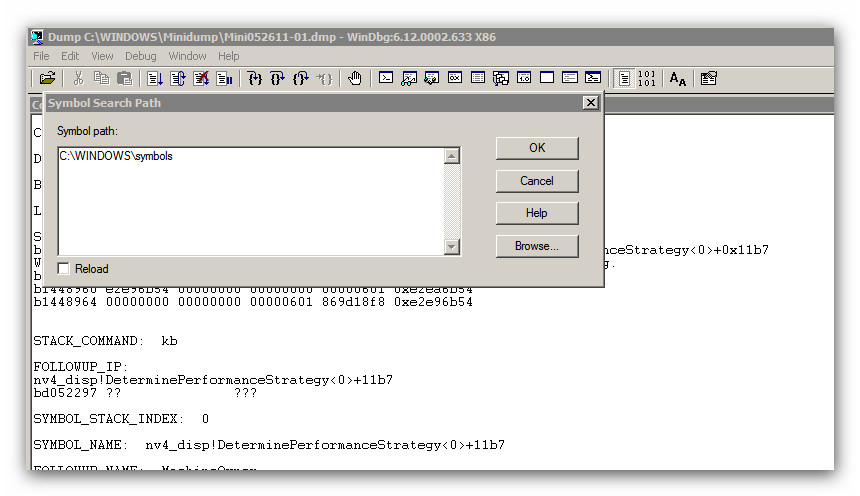
And if you prefer to use the genuine Microsoft debugger it's called WinDbg and it comes with the genuine Windows set of debugging tools, downloadable from the MSDN website (just search for it in the usual way). You'll also need the Symbols download or use the MS server like WhoCrashed does. Install it all (it's big but beautiful) and run WinDbg. You'll need to set your source files folder to C:\WINDOWS\Minidump and your symbols folder to C:\WINDOWS\symbols (or wherever you put them). Then select "open crash dump" and the specific file you want - likely to be the most recent.

When set up, click away and it'll open a report. Read it, I'll wait here.


It'll probably suggest "Use !analyze -v to get detailed debugging information" somewhere down that report, so do that as well. Again, read the report and you'll usually get the gist of what the fault was. Usually. Take what action seems reasonable (ie fix, update, upgrade or throw it in the bin and buy a new machine).

If any of the above sounds ludicrously complex then just don't do it. Take it to a shop - or (if you are on the Central Coast of NSW) call me -  instead.

Saturday, May 14, 2011

Windows 7 updates fail to install and are rolled back - again and again and again

Ever happen to you? Those automatic updates from Microsoft that usually just download and load up and self-configure at the next boot? Well with XP it has always run smoothly - if at times slowly - but with Windows 7 I have had more problems. Maybe because Win7 is on a laptop, or maybe not. So what's the beef?

Well some of these updates are big (like complete service packs) and can take hours to deploy on slow PCs on a slow network. So don't give up if it just appears to hang - wait it out.  But if Win 7 tries to configure the updates but stalls, gets to 16% or even 0% and then hangs for 5 minutes or so, thinking about life or whatever before rolling back and uninstalling the updates then you may have a problem. Of course you could just have a timeout (it's a common error code) - and it will fix itself next time around. But if you wait too long you'll fill your restore point cache with failed updates and be unable to roll back to when it all worked... ouch.

Restoring from a known working state is the usual solution, if you have such restore points available. (Make more space for your restore points, just in case. And make a recovery disk, too, just in case.)

You may also have a corrupt system file, too. You can scan your harddrive for errors and check that out.

But here's what worked for me - I did a scan to ensure that there were no file system errors and then shut down (yet again - probably after 5 or so failed updates). When completely shut down I unplugged everything bar the monitor - no USB keyboard, mouse or scanner. And restarted. Bingo! It updated perfectly!

Here are some other ideas, just in case....

The update is not installed successfully, you receive a message, and the computer restarts when you try to install an update in Windows Vista and Windows 7
configuring updates stage 3 of 3. 0% complete

Windows update error: Code 80072F8F
I was having this issue with Windows 7 and it turned out to be the root certs. I downloaded / installed the update from the link below and it fixed the issue:


Windows update error: Code 80072F8F
As a last hope I restarted last night my ADSL modem, that has not been restarted since going back to normal time. This morning I tried again to update the computer and Oh, happy day! the updates started!!!
Anyway I have no idea whether the restarting of the modem helped.

Windows update error: Code 80072F8F
I was having this issue with Windows 7 and it turned out to be the root certs. I downloaded / installed the update from the link below and it fixed the issue:


Windows update error: Code 80072F8F
I have been going crazy trying to fix this Update problem plus my gadgets were not updating. Finally about the third time I fooled around with the clock I noticed that the YEAR was wrong. Duhhhh. It was Jan 2010 instead of 2011. Sheesh!

Thursday, May 12, 2011

Just getting into 3D imagery? Have you tried these programs yet?

I'm by no means a master of 3D - yet - but I have tried a few programs and can recommend some great ways to get started. Like...

How about Bryce? PC version, of course, but Mac is supported too (just search for a link). Be careful to read the whole page or you'll miss the free rego code....
 
Bryce (Personal Learning Edition) - Free software downloads and software reviews - CNET Download.com
This Personal Learning Edition (PLE) of Bryce 7 is a full-version with no watermarks or limitations of any kind in the program itself. The licensing allows for strictly personal, non-commercial use. SERIAL CODE: BDZPLED-070-0000000-NBA-001-HBUVMLF

Bryce is an award winning, fun, feature-packed 3D modeling and
animation package designed to allow new users to quickly create and
render stunning 3D environments. Bryce combines exceptional power with
an innovative interface for incredible ease of use. Add wildlife,
people, props and more to your scenes via the DAZ Studio character
plug-in in addition to terrain, water, sky, rocks, clouds, fog,
vegetation, and architecture for which Bryce has long been the standard.

And its companion, DAZ 3D Studio...

DAZ 3D - Free 3D Software and 3D Model Providers
DAZ Studio 3 Products and Bundles
DAZ Studio is a free, feature rich 3D figure design and 3D animation
tool that enables anyone to create stunning digital imagery. This is the
perfect tool to design unique digital art and animation using virtual
people, animals, props, vehicles, accessories, environments and more.
Simply select your subject and/or setting, arrange accessories, setup
lighting, and begin creating beautiful artwork.

And Blender, an enormously useful tool for 3D work... you'll see Blender-ised 3D images built into applications all over the web...

blender.org - Home
Blender is the free open source 3D content creation suite, available for all major operating systems under the GNU General Public License.

And of course iClone 4 from Reallusion... easier to use but still powerful with a free version to boot... the real-time filmmaking is a standout.

iClone - Solution for Real-time 3D Animation 3D Stereo Video
Real-time animation evolves with 3D Video FX, motion paths, HDR and rapid drag & drop creation inside iClone4. iClone4 combines real-time filmmaking & video production inside one powerful engine. The result is a streamlined production tool for motion graphics, 3D animation, video compositing and 3D stereo creation.

That's all for now - it'll get you started anyway.

Friday, April 29, 2011

If someone rings you up and claims that your "inf" dir is full of "infected" files.... hang up

There is a scammer on the loose hoping to get into your PC by claiming that your INF files are by default "infected". They are turning what are usually harmless and necessary information files into some sort of "proof" that your PC needs help. Don't believe 'em. Just hang up and run your virus scanner on that folder to prove it to yourself. 

INF file - Wikipedia, the free encyclopedia
An INF file (stands for information) or Setup Information file, is a plain text file used by Microsoft Windows for installation of software and drivers. INF files are most commonly used for installing device drivers for hardware components. Windows includes IExpress.exe for the creation of INF-based installations. INF files are part of the Windows Setup API.


Sunday, January 23, 2011

Troubled by dodgy DNS from your ISP?

DNS stands as for Domain Name Server - a server (literally serving your requests) that converts the long and wordy web addresses you type into a browser into shorter, machine-decodable strings of numbers called IP (for Internet Protocol) addresses. It's just like looking up a telephone number by doing a name search. And it's done for you everytime you go to a web address (like http://gtveloce.com/ or whatever).

Now sometimes your local DNS 'phonebook' is down or just not up to date (it can be a day or more out of date). So when you search for a website it just doesn't appear onscreen, even when you 'know' it's there. Perhaps you even put it there. That's dodgy DNS for you. So you may wish to bypass your local DNS instead... but how do you do that?

Well you can simply replace your DNS server record in Windows (or any other operating system). It's safe and easy and completely reversible, just remember to write down your current settings (if any), just in case you need to revert.

There are usually just 2 alternative DNS address settings and your operating system tries one firstly and if it times out it tries the next. Sometimes your ISP (or Internet Service Provider) pushes the settings out to you automagically and other times they ask you (or some software) to do it instead. You may need to reboot after changing the settings, too, but only if it doesn't seem to work straight up.

Here are the instructions (for Windows XP, but Windows in general will be similar).

start->control panel->network connections->local area connection (NOT internet settings - well not usually, anyway - trust me)
->click on 'properties' and a box opens
->click on (to highlight) Internet Protocol (TCP/IP) -> and then click the 'properties' button underneath (another box opens)
->change from 'obtain DNS server address automatically' to 'use the following DNS server addresses'. The DNS server addresses may already be there, if so write them down just in case you want to roll back
->Pick some DNS server addresses from the list below (start with the closest geographic ones) and see what happens. Save all the way back, see if it works in your browser or ping or tracert in a command window (if you don't know how to do that just ignore it) to confirm - and reboot if necessary to make sure the settings have loaded. If it works, great. If not, try a different set of numbers.

Yes, it's tedious, but so is waiting for your ISP to refresh their DNS....

Here are some apparently free public DNS servers you can use (no guarantees, not necessarily tested by me and may have even disappeared - if so, try another)

Public Aussie DNS Server:
     220.233.167.31         (I tested it and it's up and working - try it)
AU,QLD:                                     58.6.115.42                (very, very slow - perhaps avoid)
AU,QLD:                                 202.83.95.227          
(fastest of these 3 - definitely try this one too)

OR try these - a bit far away from me but may be closer to you (although Google's servers are said to be fast):

Google:
8.8.8.8
8.8.4.4

Google's instructions (includes Win7): http://code.google.com/speed/public-dns/docs/using.html

or try

OpenDNS:
208.67.222.222
208.67.220.220

Hope that helps you.

Rob.  

Monday, December 13, 2010

Rollbacks, backups and restorations

Just a few notes on being cautious and careful with your data... because if you lose it, it's gone! Of course you can lose anything - including your keys, your dreams and/or your self-respect - but I'm thinking digital. With the ongoing conversion of "things" into binary digits - or "bits" - it's easy to overlook the potential for loss of data.

So here are some tips:

Hard drives fail, often suddenly. So make backups. To do this, firstly file your digital documents and images in logical spots (so you can find them easily without a hunt) then do a back up onto a different device. A backup can be as simple as a copy - onto a flash drive, a web drive, a DVD or an external HDD - or can be via backup software. As long as it's done - and works (ie test it occasionally) - it may save you from some grievous digital loss.

You can also make complete images of your working PC setup using "ghosting" or imaging software. A 'belts and braces' approach to data backup and recovery may include regular backups onto external hardware plus a working "image" of your PC or other device (again, stored externally). Sounds too hard? Get someone to do it for you.

Programs and drivers sometimes screw up, too: or "what works today may not work tomorrow". It could be that some data was re-written but was unintentionally distorted in the process, or a new program or OS update overwrote a critical shared file and left your older software out of action. It happens. So prepare for that with new system restore point (a link below on how to do that in XP, it's similar in most popular operating systems). That way you can "roll back" to a previous, working state. Often software (such as device driver updates) offer "rollbacks" as standard, in case of drama. But if they don't - and the new driver has killed something you rely upon - you need a restore point.

And remember to do the occasional test restoration, so that you know it works!

Using System Restore in XP - How-To Geek
Windows is well-known for having driver and .dll conflicts, as well as all sorts of software that causes problems with your computer. Luckily there’s a System restore feature that can return your computer back to a known working configuration, as long as you’ve created a restore point.

Note that some software installations will create restore points automatically, but you should run it manually before installing any questionable applications. (Or better yet, don’t install questionable applications!)


Tuesday, October 12, 2010

Webstuff: redirecting or refreshing a page of HTML

OK, you probably don't need to do this but I bet you've seen it done - you go to a website and suddenly - either immediately or a few seconds later - it redirects you to another site. It can be useful and legitimate or just plain deceitful and annoying. It all depends on the intention.

Well if your intentions are good then I'll tell you how it's done. (Or at least show you one way to do it - there's always more than one way.)


Here's some sample code:

(Like all HTML, wrap some brackets < > around it to make it work and pop it into the HEAD of your HTML page, ie after the HTML tag but before the BODY tag.)

meta http-equiv="REFRESH" content="0;url=http://www.the-domain-you-want-to-redirect-to.com"

(Don't forget to close off your "meta" tag, either.)

So what happens here?
Well the meta content="0;url=http://<b>the-domain-you-want-to-redirect-to</b>.com" http-equiv="REFRESH" is the part that actually does the redirecting or "refreshing". The number before the URL (in this case "0") tells your web browser the number of seconds to wait before redirecting to the new address (or URL). You could set this to 3 or 5 and add some explanatory text or just leave it at zero. Whatever suits your purposes.

So what do I do with this?

Just copy the code above into your HTML editor of choice - it could be Kompozer or even just Notepad - and save it as something that makes sense. It could be index.html if it's redirecting traffic off your domain or subdirectory root, which is the most likely use. Don't forget to change the domain name to the one you want to redirect to - and remember you can be explicit, right down to the page you want your visitor to land on.

For example I just put it to use in refreshing a page which contained an inline frame. I had a list of .PDF files inside the frame and if clicked they opened (that's the intention) - but you had to get out and back in again to get back to the list.

Instead of making visitors load a new page and then return I added a "Click here to refresh this list" button that simply took the browser out of that page to "refresh.html", a page that carries a "List refreshing now..." message and the above code. All it does is redirect back to the page with the inline frame - and voila! - the list has refreshed. Job done. And that's a legitimate use.

Sunday, October 10, 2010

Windows Live Messenger encounters problem on startup?

Let me guess. You just updated to the latest version of Live Messenger on Windows XP (and maybe later OS versions as well) and suddenly Live Messenger fails to proceed. It crashes with the "has encountered a problem and needs to close" message. Well I had that as well. And there's a quick fix.

Let me tell you firstly what doesn't work:
  • Reinstalling or repairing Live Messenger via "Add/Remove Programs" in "Control Panel" doesn't work
  • Uninstalling Internet Explore 8 doesn't work
  • Re-installing Internet Explorer 8 doesn't work
  • Running all manner of virus checkers doesn't work.
What does work is this fix from Microsoft: http://windowslivehelp.com/solution.aspx?solutionid=17e5dddf-4156-4725-a1a5-f3a10a76e12f

Well it worked for me, anyway. If you've tried everything else then it's up to you. Another way around this problem is to disable or remove it and use another messenger.

Saturday, September 25, 2010

Lenovo X200 downgrade to XP - part 2

Just to recap (and this applies in general to many laptops, not just Lenovo's) the steps in the downgrade from Vista to XP are (a) find the XP drivers for your hardware (in this example the Lenovo X200) and download them (b) go into the BIOS and switch your HDD to 'compatibility mode' and (c) boot up with the XP install disk. After that fine tune as needed. But that's not all as (as in life) there are alternatives.... like a call to Lenovo support to get the optional XP install disk.

Or, if you really want to do the job yourself have a read of this variation on the theme...

X200 remove Vista and install XP - Lenovo Community
Well, to install Windows XP you will need a Windows XP cd of course.

Insert the Windows XP cd in your external optical drive. Set the boot order in the BIOS so that your external optical drive is boot up before your hard disk. Reboot and follow the instructions :smileyhappy:
X200 remove Vista and install XP - Lenovo Community
However, I got "Setup did not find any hard disk drives installed in your computer" msg and asked me to quit the setup.

Seems it couldn't recongnize my harddisk
X200 remove Vista and install XP - Lenovo Community
Go into you Bios (by clicking on F1 while booting) and go to "Config" -> "Serial ATA (SATA)" and amend type to "Compatibilty" mode.

Afterwards press F10 to save and exit.

Now you should be able to install XP.

Once XP is installed, do not amend SATA type to original one, this would lead to a boot error.
X200 remove Vista and install XP - Lenovo Community
This solution works but however, I doubt it's the best solution because basically you're using old SATA drivers to run your Harddrive now. Here's what I did. You'll need another computer for this.


1. Get a Windows CD and copy the ISO to your PC.

2. Download nLite - Link

3. Download SATA Drivers - Link

4. Add Sata Drivers to your nLite Copy

5. Burn a Copy of this new Windows with Drivers.

6. You're set! No more BSOD.


Notes: The SATA drivers will unzip themselves in a folder make sure you pick the right one (9M). Instruction on how to add drivers on nLite are pretty easy; add "Single Driver" (read their forums for more stuff you can do to your installation).
X200 remove Vista and install XP - Lenovo Community
Actually, since this is a montevina based machine, you need to start with a XP cd that is SP2 or higher. You do need to go into the BIOS and change the SATA mode to Compatibility. Once you have installed Windows XP, you need to download the IMSM driver from lenovo's website. Once you have installed the IMSM package, go back into BIOS and change the SATA mode back to AHCI.


If you use an XP cd that is SP0 or SP1, you will blue screen on PCI.SYS. If you don't change the SATA mode to compatibility, you will likely blue screen with a 07B error.
X200 remove Vista and install XP - Page 2 - Lenovo Community
This is the way to do this.

change the sata controllor to compability.

install xp sp3.


after installation install the Intel matrix storage manager from the driver page http://www-307.ibm.com/pc/support/site.wss/MIGR-70477.html


reboot and change the sata controllor to ahci again. The driver will be automatically installed.

install .net from the ms site.

install system update from the lenovo site.

run system update.

after this installation there are still some drivers missing.

wifi, bluetooth, modem, and two pci devices.

http://www-307.ibm.com/pc/support/site.wss/MIGR-70477.html


but the tricky thing is the two pci devices.

for this one you need first to install this one

http://www-307.ibm.com/pc/support/site.wss/MIGR-70313.html

and after reboot you install this one

http://www-307.ibm.com/pc/support/site.wss/MIGR-70317.html


Now you can update xp with all the necessary updates. and you're done.


there are still some missing tools like active protection but this you can download from the site too!
X200 remove Vista and install XP - Page 2 - Lenovo Community
i used nLlite with my own XP Pro disk and Lenovo drivers. With no prev experience with nLite, I found it very easy. Will do this from now on.
Windows XP Clean Install
Welcome to the Windows XP Clean Install/Downgrade Guide!

I've seen a lot of threads asking how they should do a clean install and what they should do when problems occur. So I've made this thorough guide so everyone can have a stable, clean, and complete installation of Windows XP without any 3rd party software. ThinkVantage applications are considered 3rd party software. This Clean Install Guide can also help with slow boot up times (mine went from 90 seconds to 30 seconds from the moment I press the power button to a usable desktop), BSOD's (Blue-Screens-of-Death), a slow, unstable system, adware, spyware, viruses, and many more problems. The Guide can be used to install XP on any ThinkPad, e.g., T61(p), R61(i/e), X61(s), T60(p), etc.

The guide is somewhat tedious to follow due to its length. Please follow the guide carefully and make sure not to skip anything or else your computer will be incomplete. This guide can also be used as a downgrade from Vista to XP.
ThinkPad SuperGuide
Windows XP Clean Install

Method 1 (manual driver installation)

1. Backup data if necessary.
2. Use the Driver Matrices to download the following drivers/software and their respective readme's to an external storage device: